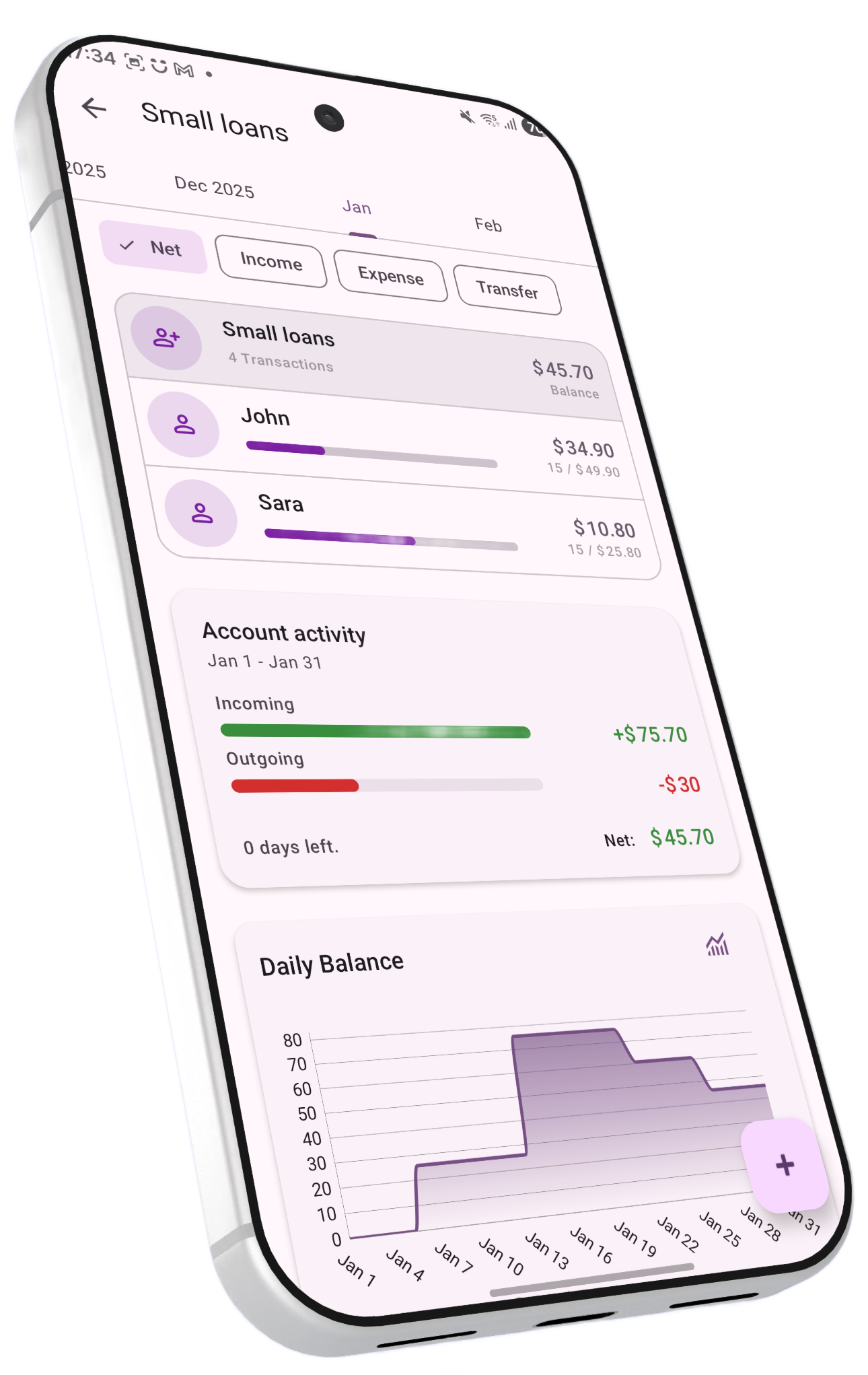
Track money lent, money borrowed, and running tabs with friends and contacts — fully integrated into your portfolio, net worth, and financial reports.
Personal loans cover the informal, everyday money that moves between people — lending a friend money for dinner, splitting rent with a roommate, borrowing cash from a family member, or keeping a running tab with a colleague. BudgetViz tracks these with dedicated account types where each contact has their own balance, transaction history, and repayment progress. A personal loan account groups everything by contact, so you always know who owes whom and how much.
Part of your financial picture. Personal loan accounts are real accounts. Money lent to friends is an asset (others owe you), and money borrowed is a liability (you owe others). Including them gives you a more accurate net worth and a complete view of your financial standing.
BudgetViz offers three personal loan account types, each suited to a different lending pattern. You can create multiple accounts of each type if it helps you stay organized.
Track money you've lent out. Each contact shows their outstanding debt and how much they've repaid. A progress bar shows repayment progress against the total amount lent — you can see at a glance who's paying back and who isn't.
Track money you've borrowed. Each contact shows your outstanding debt and how much you've repaid. A progress bar shows repayment progress against the total amount borrowed — making it easy to see where you stand with each person.
A flexible, two-way tab. Each contact can have a positive balance (they owe you) or a negative balance (you owe them). Ideal for long-term relationships where money flows in both directions — roommates, couples, or close friends who frequently cover each other.
Choosing the right mode. Use Loans to Contacts or Loans from Contacts when the flow of money is predominantly one-directional — you lend, they repay (or vice versa). These modes show repayment progress bars for each contact. Use Running Balances when money goes back and forth between you and a contact, with the net balance being what matters.
Every personal loan is tied to a contact. Contacts are identified by name and stored as tags on each transaction — this means you don't need a separate contacts list. You create contacts simply by typing a name when you record a loan.
When you open a personal loan account, you see a list of all contacts with outstanding balances. Each contact entry shows their current balance, transaction count, and — for directional loan accounts — a progress bar showing how much has been repaid relative to what was originally lent or borrowed.
If you need to correct a contact's name — a typo, a preferred name, or just better formatting — you can rename them. This updates the contact name across all associated transactions, both past and future.
Contacts are shared across accounts. The same contact can appear in multiple personal loan accounts. If you both lend money to and have a running tab with the same person, they'll appear in both accounts independently.
Tap the add button on any personal loan account to record a new loan transaction. The available actions depend on the account mode.
Record money you're lending to someone. Select or create a contact, optionally choose a source account the money is coming from, and enter the amount.
Record a repayment from a contact. This reduces their outstanding balance and increases their repayment progress.
Record money you're borrowing from someone. Select the contact and optionally choose which account receives the cash.
Record a repayment you're making. This reduces your outstanding debt to the contact.
Record that a contact owes you money — increases their balance in your favour.
Record that you owe a contact money — shifts the balance in their favour.
When recording a loan transaction, you can choose whether actual money is moving between accounts. If someone pays you back in cash or by bank transfer, select the account receiving the funds — BudgetViz will update both the loan account and the receiving account (e.g., your bank account or cash wallet) automatically.
Sometimes a debt is reduced without a direct transfer of funds. For example, a friend who owes you money might pay for your lunch, or do a service worth the amount owed. In these cases, don't select a linked account — the loan balance is reduced without affecting any other account.
Auto-generated descriptions and categories. BudgetViz automatically suggests a description and loan subcategory for each transaction based on the type and contact. You can override both if you prefer your own wording or a different categorization.
Tapping a contact in the list opens an action menu with options specific to that person. These let you manage the relationship without leaving the account view.
View a line chart of the contact's balance over time within the current period
Rename the contact across all associated transactions
Zero out the balance and archive the contact's loan history
Record a new loan or repayment pre-filled with this contact
The specific loan and repayment actions in the menu match the account mode — for instance, a Loans to Contacts account shows "Add new loan" and "Repay credit", while a Running Balances account shows "Add credit" and "Add debt".
Long-press on any contact to activate contact filter mode. This filters the entire account view — including the transaction list, charts, and category breakdowns — to show only transactions related to that specific contact.
This is useful when you want to review the full transaction history with a single person, or see their spending patterns across categories. The filter is shown in a toolbar at the top of the screen with the contact's name and a close button to exit the filter.
When a debt is fully resolved, you can settle the contact's balance. Settling creates a transaction that brings the contact's balance to zero and archives all their associated transactions.
A settlement transaction is created for the exact amount needed to bring the contact's balance to zero. If they owed you 150, a −150 transaction is recorded (and vice versa). The amount is pre-filled and locked.
All transactions with that contact are tagged as archived. They remain in your data and reports but no longer appear in the active contact list — keeping the account view clean and focused on outstanding balances.
Once settled, the contact no longer shows up in the account's contact list. If you lend to or borrow from them again in the future, they'll reappear with a fresh balance.
Archived transactions are still accessible. Settlement doesn't delete anything. The transaction history is preserved and still shows up in reports and search results. Archiving simply removes the contact from the active balance view.
Personal loan transactions are automatically categorized under a dedicated loan category with specific subcategories that describe the nature of each transaction. This makes it easy to see in reports not just that money moved, but why.
The subcategory is automatically suggested based on the transaction type and direction, but you can override it. Available subcategories include: paid for contact, lent cash, owed for service, owed for items, paid for me, borrowed cash, owe for service, owe for items, repayment, settlement, loan fees, and loan interest.
These subcategories appear in your reports and analytics, so you can answer questions like "How much have I lent in total this year?" or "What's the breakdown of what people owe me for — services, items, or cash loans?"
Personal loan accounts integrate with BudgetViz's transaction splitting feature. When you split an expense — say, a restaurant bill you paid on behalf of friends — each person's share is automatically created as a loan transaction on a running-balance loan account.
A $90 dinner bill is recorded as an expense on your checking account.
You assign $30 to Alice and $30 to Bob. Your share is the remaining $30.
Child transactions are created on your running-balance loan account — $30 credited to Alice's tab and $30 to Bob's. Their contact balances update immediately.
Alice and Bob now show up in your loan account with outstanding balances. When they pay you back, record repayments or settle as normal.
This means you don't have to manually create loan entries when you pay for a group — the split feature handles it. All split-created loans are linked back to their parent transaction, so you always have a clear audit trail.
Requires a running-balance loan account. Transaction splitting creates loan entries on a "Running Balance" type personal loan account. If you don't have one, BudgetViz will prompt you to create one when you first try to split a transaction.
When you link a loan transaction to an account in a different currency — for example, lending from a USD checking account into a SEK personal loan account — BudgetViz automatically converts the amount using the current exchange rate. Both sides of the transfer are recorded in their respective currencies, keeping each account balance accurate.
Choose the right currency for your loan account. Create the personal loan account in the currency you most often lend or borrow in. If most of your personal loans are in your home currency, that's usually the best choice.